Lorem ipsum dolor sit amet, consectetur adipiscing elit. Suspendisse porttitor molestie interdum. Quisque mollis aliquet velit non pellentesque. Donec ullamcorper, nunc ac convallis volutpat, nibh lacus posuere libero, ut pulvinar velit mi sed tortor. Sed ventus lectus, non venenatis turpis tempus sit amet arcu imperdiet cursus nec leo. Duis fermentum lacinia. Donec elementum magna quis lectus imperdiet faucibus. Nulla convallis sagittis. Fusce ullamcorper faucibus volutpat.

Web Accessibility
Why Web Accessibility Matters for Everyone
Web accessibility is becoming increasingly important, both as a part of building better digital experiences for everyone and from a legal perspective. With regulations such as Germany’s Accessibility Improvement Act (Barrierefreiheitsstärkungsgesetz, or BFSG), companies are being asked to think more carefully about how people with different needs interact with websites and applications.
At K3B, we believe that great software should work for everyone. Accessibility is therefore an essential part of creating high-quality user interfaces that are intuitive, inclusive, and easy to use.
To explore the topic in more depth, Sofia completed advanced training in digital accessibility. In this two-part series, she shares some of the key ideas and practical lessons from that training, starting with the fundamentals of web accessibility and why they matter.
”Accessible design is essential for some and useful for all”
Great software should work for everyone.


Around 1 in 6 people worldwide, roughly 1.3 billion people, live with a significant disability.
And that number doesn’t tell the whole story. Disability isn’t always something people are born with. It can be temporary, develop over time, result from injury or illness, or simply be part of getting older. As the population ages, many more people experience changes in their vision, hearing, mobility, or dexterity, yet don’t necessarily identify as “a person with a disability.”
Whatever the circumstances, these experiences can affect how we interact with technology: sometimes for a few weeks, sometimes for the rest of our lives. Accessibility supports people through these changes too.
But what exactly does accessibility mean, especially when we talk about the web?
What is accessibility?
Web accessibility means designing and developing websites, tools, and applications so that as many people as possible can use them effectively. It is about making sure that people can perceive, understand, navigate, interact with, and contribute to the web, regardless of their abilities, needs, or the way they access technology.
This can mean ensuring that someone who is blind can navigate a website with a screen reader, that someone with limited mobility can use a keyboard instead of a mouse, or that someone with cognitive differences can understand and interact with content more easily.
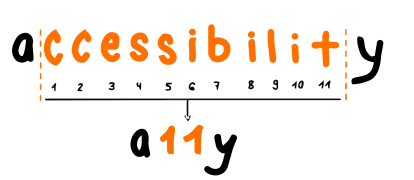
A11y (pronounced “A-eleven-y”) is a numeronym for the word accessibility. It stands for the practice of designing and building digital tools, websites, and apps so they can be used by everyone, including people with physical, sensory, or cognitive disabilities.
Essential for some, useful for all
Accessibility is often described as “essential for some, useful for all”. Many features initially created with accessibility in mind improve the experience in a wide range of situations, for example:
- Captions and transcriptions
are essential for people who are deaf or hard of hearing, but also useful in noisy environments, without sound, or when skimming content quickly. - High contrast and readable text
supports people with low vision, while also making content easier to read in direct sunlight. - Clear headings and structure
allow screen reader users to navigate, while also making long pages easier to scan.
How people access technology differently
We often interact with technology without thinking about the many different ways people access and use it. Most of us might use a mouse, touchscreen, or keyboard, but these are not the only ways people interact with digital experiences.
Disabilities are diverse, and they can affect different aspects of how someone perceives, understands, navigates, or interacts with the digital world. The tools and methods people use will depend on their individual needs, preferences, and circumstances.
Some common examples include:
- Visual disabilities: People who are blind, have low vision, or experience colour vision deficiencies may use screen readers, magnification tools, high-contrast settings, or rely on alternative text. Screen readers convert text and interface elements into spoken output, and can work alongside braille displays.
- Auditory disabilities: People who are deaf or hard of hearing may rely on captions, transcripts, visual notifications, or sign language interpretation.
- Motor disabilities: Differences in movement, strength, coordination, or dexterity may mean someone uses a keyboard instead of a mouse, voice controls, switches, joysticks, or other alternative input devices.
- Cognitive and neurological disabilities: Clear language, predictable layouts, consistent navigation, and simple interactions are especially important.
- Speech disabilities: Digital experiences should not assume voice interaction is possible for everyone.
There is no single way people use technology. These categories help us understand different accessibility needs, but real experiences are much more complex. Disabilities can overlap, and people within the same category may have completely different needs.
Disabled creators and how they use technology
Have a look at these amazing people and how they use technology. This Youtube playlist collects videos of creators with disabilities sharing the tools and techniques they use every day:
The four principles of accessible design (POUR)
One of the key concepts in accessibility is the POUR framework. It helps developers and designers think beyond individual fixes and focus on creating experiences that work for a wide range of users. These principles form the basis of the Web Content Accessibility Guidelines (WCAG).
-
Perceivable
Users need to be able to perceive the information — text alternatives for images, sufficient colour contrast, captions for videos, and content that can adapt to different screens or technologies. -
Operable
People should be able to use the interface regardless of how they interact with it. Can every function be completed using only a keyboard? Is the focus order logical? Are buttons large enough to activate? -
Understandable
A website should be predictable and easy to understand. Clear navigation, meaningful headings, simple language, consistent layouts, and helpful error messages all make a huge difference. -
Robust
Content should work across different browsers, devices, and assistive technologies — not just today, but as technology evolves. Building with semantic HTML and following web standards makes that possible.
Accessibility means flexibility, not a single solution
One thing I realised is how much our own experiences shape what we’re aware of. If, like me, accessibility has never directly affected your daily life — through a loved one, your work, or your own experiences — you might not have stopped to consider that people within the same category of disability can have completely different, and sometimes even opposite, accessibility needs.
For example, take someone with a visual impairment. If I asked you which of these two designs would be easier to read — one with small text or one with large text — what would you choose?
Lorem ipsum dolor sit amet, consectetur adipiscing elit. Suspendisse porttitor molestie interdum. Quisque mollis aliquet velit non pellentesque. Donec ullamcorper, nunc ac convallis volutpat, nibh lacus posuere libero, ut pulvinar velit mi sed tortor. Sed ventus lectus, non venenatis turpis tempus sit amet arcu imperdiet cursus nec leo. Duis fermentum lacinia. Donec elementum magna quis lectus imperdiet faucibus. Nulla convallis sagittis. Fusce ullamcorper faucibus volutpat.
I know what my answer would have been. The larger text, of course!
But… that’s not always the case.
Tunnel vision was one of the examples that changed my perspective on the matter. People with tunnel vision may only see a small central area of their visual field, almost as if they’re looking through a narrow tube. Many of them have excellent visual acuity. The challenge isn’t reading small letters — it’s seeing enough of the page at once.
Lorem ipsum dolor sit amet, consectetur adipiscing elit. Suspendisse porttitor molestie interdum. Quisque mollis aliquet velit non pellentesque. Donec ullamcorper, nunc ac convallis volutpat, nibh lacus posuere libero, ut pulvinar velit mi sed tortor. Sed ventus lectus, non venenatis turpis tempus sit amet arcu imperdiet cursus nec leo. Duis fermentum lacinia. Donec elementum magna quis lectus imperdiet faucibus. Nulla convallis sagittis. Fusce ullamcorper faucibus volutpat.
Lorem ipsum dolor sit amet, consectetur adipiscing elit. Suspendisse porttitor molestie interdum. Quisque mollis aliquet velit non pellentesque. Donec ullamcorper, nunc ac convallis volutpat, nibh lacus posuere libero, ut pulvinar velit mi sed tortor. Sed ventus lectus, non venenatis turpis tempus sit amet arcu imperdiet cursus nec leo. Duis fermentum lacinia. Donec elementum magna quis lectus imperdiet faucibus. Nulla convallis sagittis. Fusce ullamcorper faucibus volutpat.
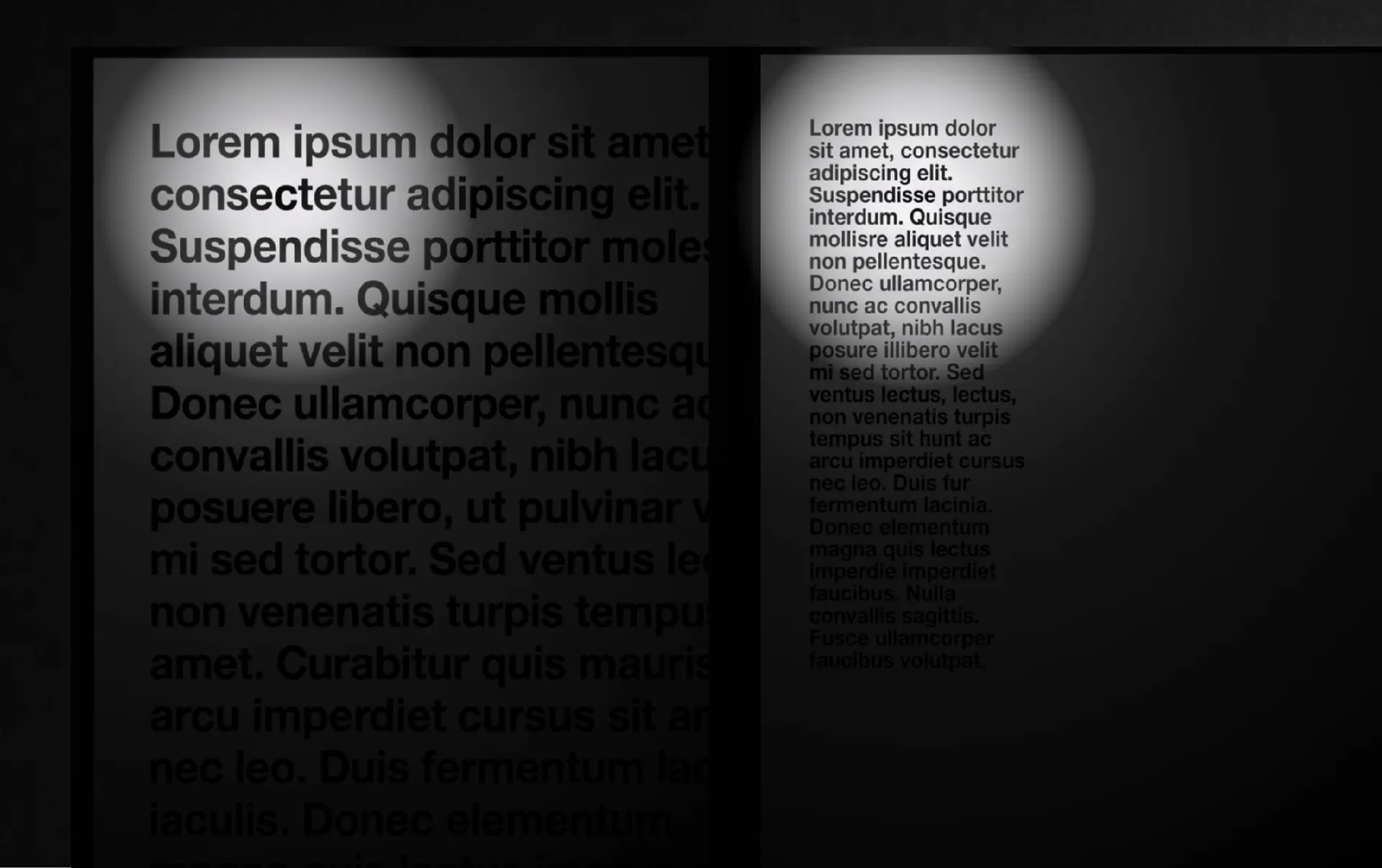
That is why accessibility is not about guessing what someone needs. It is about creating experiences that allow people to adapt technology to their own situation.
Further information
In Part II we move from the “why” to the “how”: practical choices in HTML, visual design, keyboard interaction, forms, error handling, and application architecture.